You searched for an SP3D download expecting what Revit or AutoCAD give you: a vendor page, an installer, maybe a student licence. There isn't one. But the reason is not simply that Hexagon charges for it, and the real reason is far more useful to know, because it changes what you should do next.
There is no free, public or student download of SP3D. The software is now called Intergraph Smart 3D, owned by Hexagon, and it is licensed commercially to organisations on a quote basis. But price is not the real barrier. Smart 3D is a client-server system, not a desktop application: it needs a Microsoft SQL Server or Oracle database server, a site server, and a Windows Active Directory domain, with Hexagon recommending 32 to 128 GB of RAM on the database server and under 1 ms network latency between client and database. Even a legitimate copy of the client installer does nothing useful on a personal laptop. The three real routes to hands-on Smart 3D are an employer licence, a vendor demo, or licensed lab access through a training provider.
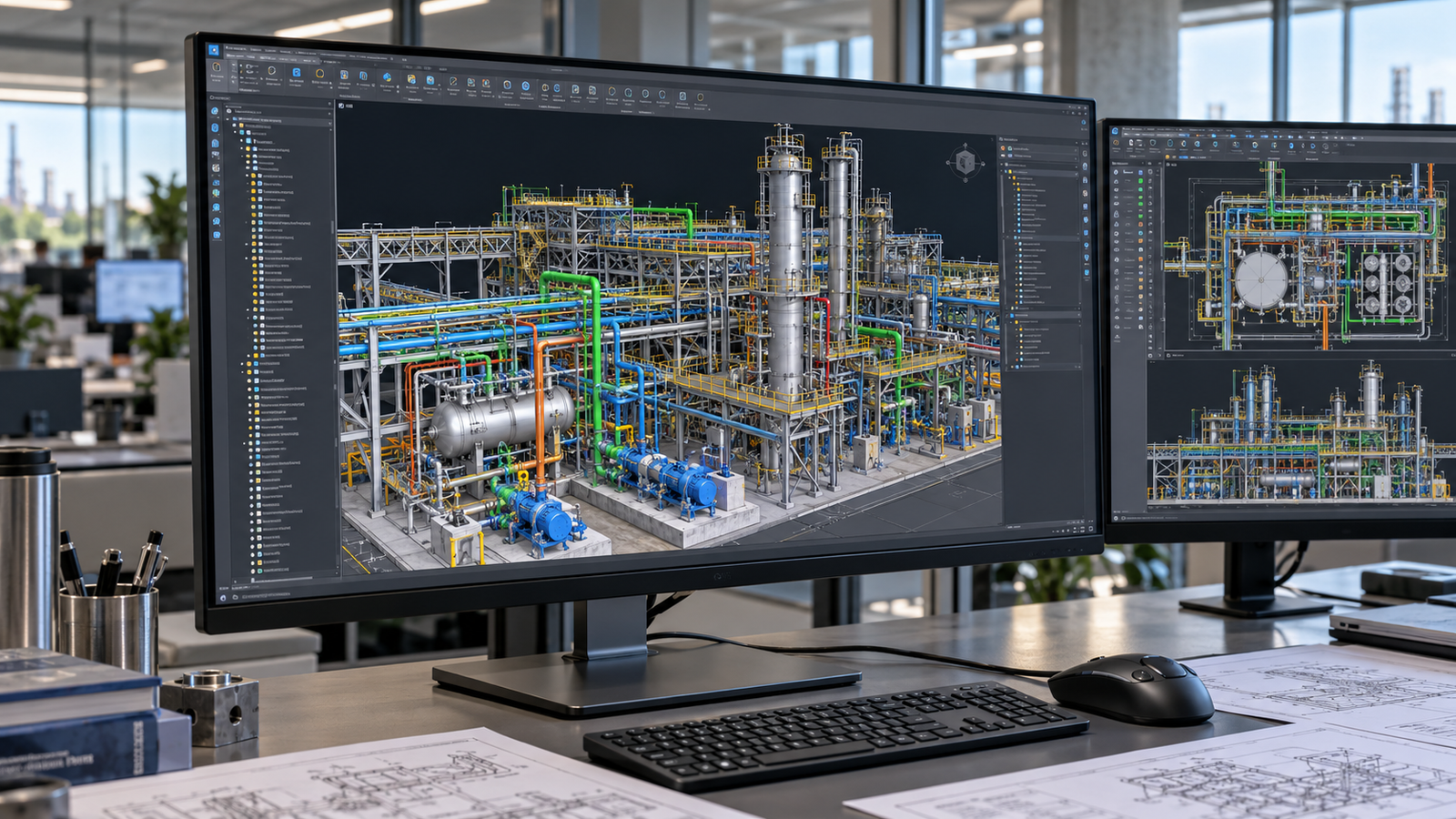
Smart 3D as it is actually used: a licensed seat on a domain-joined workstation, connected to a project database on a server elsewhere in the building.
TL;DR
Key takeaways
- No free, public or student version exists. Unlike Revit or AutoCAD, Hexagon offers no education licence for Smart 3D.
- The name changed. PDS became SmartPlant 3D, which became Intergraph Smart 3D. Version 14 is out. Most engineers still say "SP3D".
- The real barrier is architecture, not price. It is a client-server system needing a SQL Server or Oracle database on a Windows domain, not a desktop installer.
- Hexagon recommends 32 to 128 GB RAM on the database server and sub-1 ms latency to the client. A laptop install is not a scaled-down version of this; it is not a version of it at all.
- Three legitimate routes: your employer's enterprise licence, a vendor demo or quote through Hexagon or a reseller, or licensed lab access through a training provider.
- Pricing is quote-based and unpublished, negotiated per organisation. Any specific figure online is an unverified estimate.
- If you do have access, most failed installs are version mismatches. Hexagon's Compatibility Matrix is the authority and overrides the installation guide.
What Is SP3D Software?
SP3D is plant design software for engineering, procurement and construction projects, now sold by Hexagon as Intergraph Smart 3D. It lets multiple engineering disciplines model the same facility concurrently in one shared, data-rich 3D model, where every component carries not just geometry but engineering data: material grade, pipe schedule, design conditions, insulation, procurement status.
The name confusion, resolved
Three names describe the same lineage, which is why searches return a mix of all of them. PDS was the original, a 2D and 3D hybrid running on MicroStation. SmartPlant 3D was a complete rewrite on a relational database architecture, and this is where the abbreviation "SP3D" comes from. Intergraph Smart 3D is the current name under Hexagon, and the change from SmartPlant 3D was incremental rather than a rewrite. Many engineers, and a great many job advertisements, still say SP3D, so treat the terms as interchangeable in conversation while knowing which one is actually current.
Who uses it
- Piping designers and engineers, the largest user group, routing lines against specifications and producing isometrics.
- Equipment and layout engineers, placing and arranging plant items.
- Structural designers, modelling pipe racks, platforms and supporting steel.
- Electrical and HVAC designers, routing cable trays and ducting through the same model.
- Marine and offshore designers, for ships, platforms and FPSOs, using the software's marine mode.
Typical job titles: Piping Designer, Piping Design Engineer, 3D Modeller, Plant Design Engineer, SP3D Administrator. In India and the Gulf these sit mostly with EPC contractors and engineering consultancies serving oil and gas, petrochemical, LNG and power clients.
Is SP3D Really Free to Download?
No. There is no public, free or student edition of Intergraph Smart 3D. This is worth stating plainly because it differs from what engineering students are used to.
Autodesk gives students and educators free education licences for Revit and AutoCAD. Dassault and others run similar programmes. Hexagon does not do this for Smart 3D. It is enterprise software sold to organisations, not to individuals, and there is no individual purchase path comparable to buying one seat of a desktop CAD package.
On the results you will have already seen
Searching for a free SP3D download surfaces results promising exactly that. Those are not a route to learning this software, and this guide will not point you toward them. Beyond the obvious legal and malware exposure, there is a practical reason they fail that is specific to this product, and the next section explains it: the client on its own is not the software. What those results offer, even taken at face value, is one component of a multi-machine system that does nothing in isolation.
What about SmartPlant FreeView?
Hexagon has offered free viewer tools that open and navigate published models. A viewer is not the design software. You can look at a model someone else built, rotate it, measure it and interrogate its data. You cannot route a pipe, apply a specification, run interference checks or produce drawings. For understanding what a plant model contains it has some value; for learning to design, none. Check Hexagon's current product pages for what is available today, since viewer offerings change.
Why a Download Alone Would Not Help
This is the part almost no article on this keyword explains, and it is the part that actually answers your question.
Smart 3D is not a desktop application. It is a client-server system. What you install on a workstation is a client that is useless without infrastructure behind it. Hexagon's own installation documentation is explicit about what that infrastructure is.
| Component | What it is | Why the client cannot work without it |
|---|---|---|
| Database server | Microsoft SQL Server or Oracle, on Windows Server 2019 or 2022 | The model is the database. Geometry and engineering data live here, not in files on your machine |
| Site server and site database | Holds the site configuration and the list of plants or models | The client connects here on launch to find out what it may open |
| Active Directory domain | A Windows domain the servers and clients are joined to | Hexagon's server recommendations specify a domain. Authentication and access control depend on it |
| Network | 1 GbE or higher, client-to-database latency under 1 ms | Every modelling operation is a database transaction. Latency is felt continuously, not occasionally |
| Workstation client | The part people think of as "SP3D" | On its own, it is an interface to a database that does not exist |
The honest summary
Hexagon recommends 32 to 128 GB of RAM per database instance, scaling with project size, on a server-class operating system joined to a corporate domain. A personal laptop installation is not a scaled-down version of this. It is not a version of it at all. This is why the question "where do I download SP3D" has no satisfying answer, and why the better question is "how do I get access to a configured environment", which does have three real answers.
System Requirements
Requirements split across the servers and the workstation, and the server side is where the serious numbers are. Figures below are from Hexagon's published installation documentation.
| Database server | Workstation client | |
|---|---|---|
| Operating system | Windows Server 2019 or 2022 (Standard or Datacenter), on an Active Directory domain. Oracle Linux where Oracle is the database | A supported Windows desktop OS, domain-joined |
| RAM | 32 GB to 128 GB per database instance, scaling with project size | Workstation-class; check the Compatibility Matrix for the release |
| Database | Microsoft SQL Server or Oracle | Matching database client tools installed |
| Network | 1 GbE or higher interface | Latency to the database server under 1 ms |
| Other prerequisites | MSXML 6.0 SP1; Adobe Reader for documentation | SQL Server client tools, or Oracle 64-bit client for interference checking, batch drawing publishing, name generator and the Web API |
| Privileges | Database administrator access | Administrator privileges on the machine |
| Hexagon's Compatibility Matrix lists officially supported versions per release and overrides the installation guide where they differ. Check it first. | ||
Disk space is not the constraint people expect
The usual instinct is to ask how many gigabytes the installer needs. On Smart 3D that is nearly the least important number, because the model does not live on your machine. Project storage sizing is a database server question, and Hexagon publishes separate project hardware sizing guidance for it. What matters on the workstation is the database client tools, the domain membership and the network path to the server. An engineer with a fast laptop and no domain is further from running Smart 3D than one with a modest laptop inside a configured corporate network.
How to Request Access: The Three Legitimate Routes
Match the route to your situation rather than trying all three.
If you are currently employed in the industry, start here
A surprising number of people search for a download while working at a company that already owns seats. Ask your design manager or IT team two questions: does the organisation hold Smart 3D licences, and is there a spare seat or a training environment available. Contractors often have licences attached to a project that are idle between phases, and access for an employee who wants to learn is an internal approval rather than a procurement exercise. It costs one conversation and it is the fastest route that exists.
Step-by-Step: Installing SP3D After You Have Access
This assumes your organisation has licensed the software and an administrator has already built the database server, site server and site database. If that is not true, the steps below will complete and produce nothing usable.
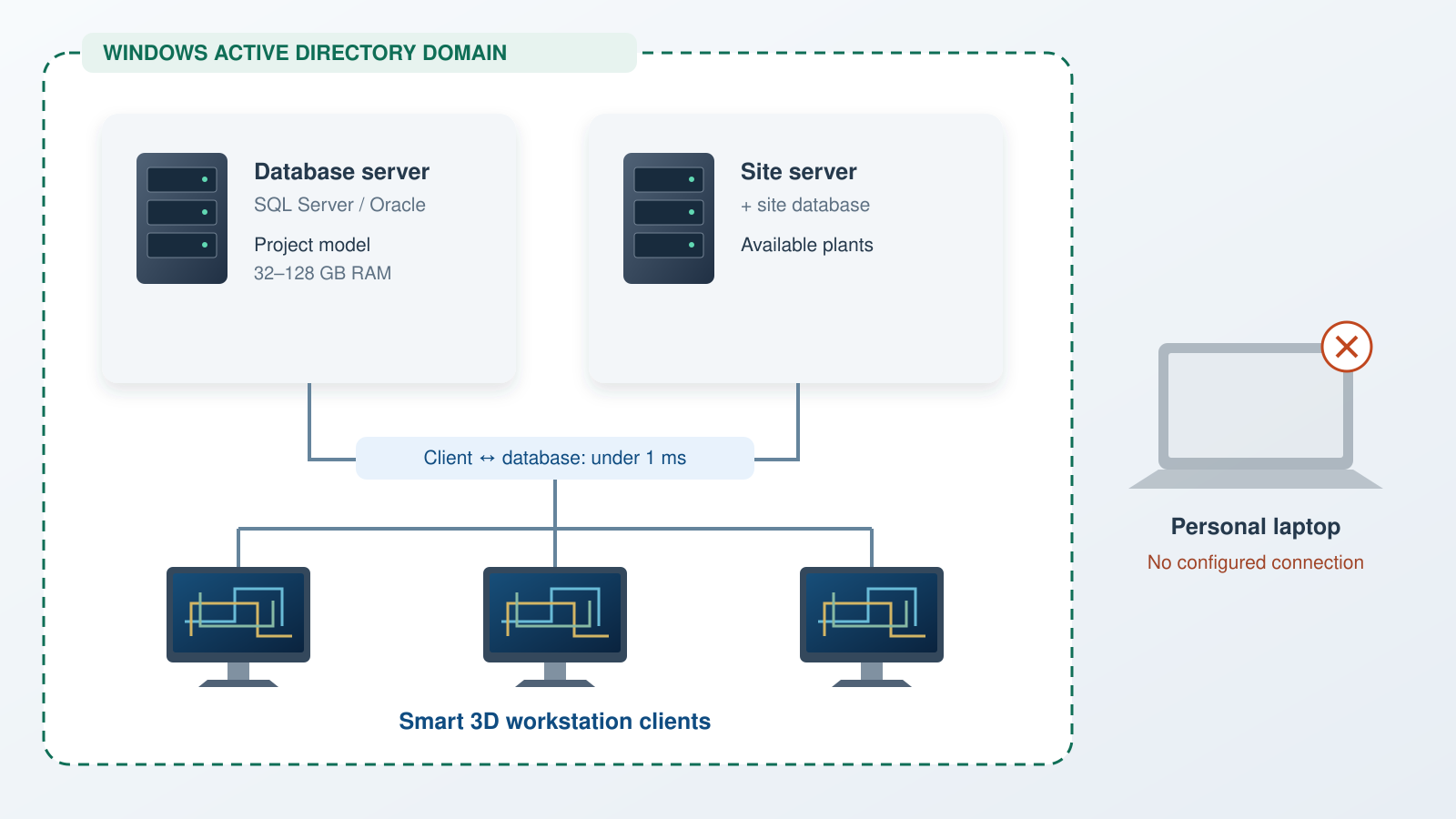
Why the client alone does nothing. Everything inside the dashed boundary has to exist before the thing people call "SP3D" has anything to open.
Setup.exe in the root folder of the installation media, right-click and select Run as administrator rather than double-clicking, then choose Full Installation and enter your name and organisation.TNSNAMES.ORA from an already-configured machine into the Oracle client's Network\Admin folder, and add a firewall inbound rule for the Oracle listener port. Set the Name Generator service startup type to Automatic and configure the account it runs under.Common SP3D Installation Errors and How to Fix Them
Nearly every install failure falls into three families, and two of them are not really installation problems at all.
The diagnostic that saves the most time
Before debugging your machine, ask whether anyone else can connect right now. If nobody can, it is the server, the licence pool or the network, and nothing you do locally will help. If everyone else can and you cannot, it is your client, your permissions or your network path. That one question splits the problem in half in thirty seconds, and skipping it is how people lose a day reinstalling a working client.
Can't Get Access to SP3D? Learn It Hands-On With Guided Lab Access
If you have read this far, you are probably in the situation this page was written for: no employer licence, no company to request a vendor demo as, and now the knowledge that a personal install was never going to work anyway.
That is not a dead end, but it does mean the goal has to change. You cannot solve this by finding a better download. You solve it by getting access to an environment someone else has already licensed and configured.

The realistic route for an individual learner: a seat in an environment that is already licensed and configured.
What to look for in any course, ours or anyone else's
- Licensed lab access from the start. If a course cannot tell you clearly how you will access the software, that is the whole question left unanswered. You should be modelling in the first week, not troubleshooting an install.
- Real project data, not toy models. A three-line exercise teaches the buttons. A realistic model with specifications, clashes and drawing deliverables teaches the job.
- Piping knowledge alongside the software. Employers hire piping designers who understand piping, not people who can operate a tool. Specifications, supports, stress awareness and isometric conventions matter as much as the interface.
- Deliverables you can show. A completed model and a set of isometrics do more at interview than a certificate.
- Honesty about outcomes. Be cautious with placement guarantees. Ask instead which specific companies and roles recent students went to.
Our Piping Design programme is built around that first point: you get a seat in a licensed, configured environment from week one, so the infrastructure problem this article describes is simply not yours to solve. The rest of the course is spent where it should be, on modelling and on the engineering behind it.
Frequently Asked Questions
Sources
- Hexagon, Intergraph Smart 3D product pages, hexagon.com, for current product naming, positioning and version information.
- Intergraph Smart 3D Installation documentation, docs.hexagonppm.com, for the installation procedure, component selection, industry modes, database client prerequisites and service configuration described above.
- Smart 3D Database Server Recommendations (Intergraph Smart 3D Installation and Upgrade documentation), for the server operating system, Active Directory domain requirement, the 32 GB to 128 GB RAM per database instance recommendation, and the sub-1 ms client-to-database latency guidance.
- Hexagon Compatibility Matrix, the authoritative list of officially supported versions per release, which overrides the installation guide where the two differ.
Scope and currency of this guide
Requirements, component names and supported versions change between Smart 3D releases, and the figures here describe recent documented versions rather than one specific release. Always check Hexagon's Compatibility Matrix and the installation guide for your exact version before planning a deployment. This guide describes the workstation installation an engineer performs; building the database and site servers is an administrator task with its own documentation and is outside this scope. Licensing terms, available products and viewer offerings are set by Hexagon and may change, so confirm current availability on their site rather than relying on any third-party summary, including this one.
This article was last reviewed on 1 August 2026.
