Autodesk trained a generation to expect a student login, a download button and a working licence in ten minutes. Pipe stress software does not work that way, and the disappointment is worse than it needs to be because nobody says so plainly. There is no CAESAR II student edition. There are three real routes, and one of them is probably available to you already.
There is no free student or education edition of CAESAR II. Unlike Autodesk, the vendor runs no equivalent programme. The software was renamed Octave Aspect Pipe Stress in 2026, when Octave Intelligence separated from Hexagon, though almost everyone still says CAESAR II. Three routes actually work: an employer or institution that already holds a licence, which is the fastest and most overlooked; a time-limited evaluation licence requested through the vendor, aimed at organisations rather than individuals; or licensed access through a training provider. Current versions use Intergraph Smart Licensing, a cloud system that replaced the old USB dongles, and CAESAR II stopped responding to HASP keys after 31 May 2020.
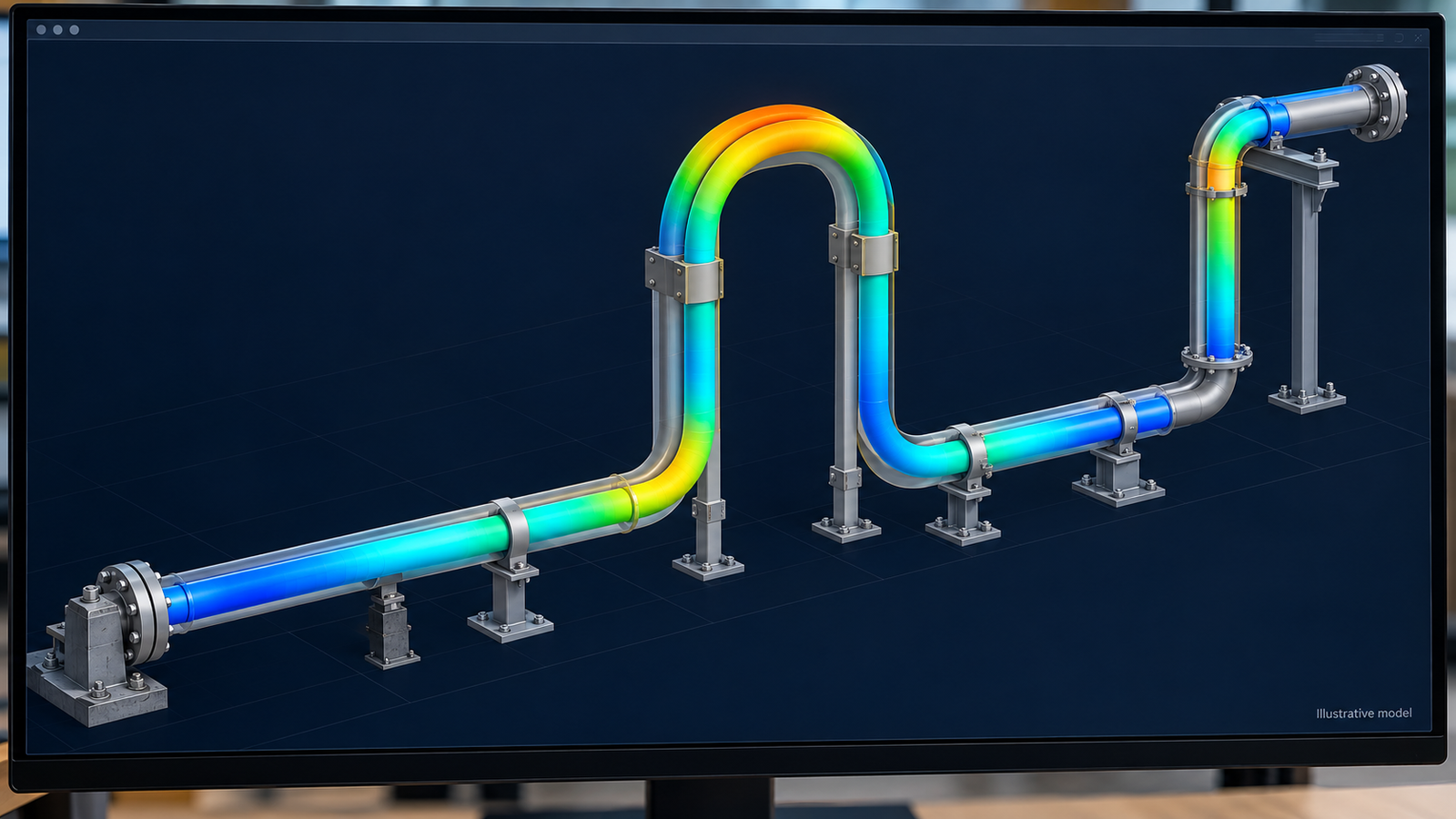
What the software is for: predicting how a piping system moves and where it is overstressed, before it is built.
- TL;DR
- What is CAESAR II, now Octave Aspect Pipe Stress?
- Trial vs licensed access: which do you need?
- How to request a free trial
- Getting it through an authorised reseller
- System requirements to check first
- How to install it
- Smart Licensing vs legacy HASP keys
- First launch and activation
- If you can't get a licence fast enough
- FAQs
- Sources
TL;DR
Key takeaways
- No student edition exists. There is no CAESAR II equivalent of the free Autodesk education licence, and no amount of searching will produce one.
- The name changed in 2026. CAESAR II is now Octave Aspect Pipe Stress, after Octave Intelligence separated from Hexagon. Same software, same workflows, new brand.
- Check for an existing licence first. If you work in the industry or study somewhere with an engineering software programme, access may be an internal request rather than a purchase.
- Evaluation licences are time-limited and organisation-oriented. A fifteen day evaluation has been commonly offered; confirm current terms with the vendor rather than trusting any figure online.
- Pricing is quote-based and unpublished, varying by seats, licence type, modules and region. In India and the GCC this runs through regional resellers.
- Licensing is cloud-based now. Intergraph Smart Licensing replaced USB dongles, and HASP keys stopped working after 31 May 2020.
- Windows only. There is no macOS version, so Mac users need a Windows VM, Boot Camp on older hardware, or a remote desktop.
What Is CAESAR II, Now Octave Aspect Pipe Stress?
CAESAR II is pipe stress analysis software: it predicts how a piping system will move, what loads it will impose on its supports and connected equipment, and whether the resulting stresses comply with the applicable code. It handles thermal expansion, sustained weight and pressure, wind, seismic and other dynamic loads, and checks against more than thirty international codes including ASME B31.1, B31.3, B31.4 and B31.8.
The 2026 name change, and why it matters to your search
In May 2026, Octave Intelligence completed its separation from Hexagon and began trading as an independent public company, taking the former Hexagon Asset Lifecycle Intelligence portfolio with it. The entire engineering range was renamed, and CAESAR II became Octave Aspect Pipe Stress, within the new Aspect family for engineering analysis. The vendor's position is that functionality, project data and workflows are unchanged and the difference is naming. What this means practically: the company you contact is Octave rather than Hexagon, official pages have moved, and much of the documentation you will find still carries the Hexagon and Intergraph names while remaining technically accurate. Job advertisements will say "CAESAR II" for years yet.
| Current name (2026) | Formerly | Family |
|---|---|---|
| Octave Aspect Pipe Stress | CAESAR II | Aspect (analysis) |
| Octave Aspect Pressure Vessel | PV Elite | Aspect (analysis) |
| Octave Aspect Structure | GT STRUDL | Aspect (analysis) |
| Octave Forte 3D | Smart 3D / SP3D | Forte (3D design) |
| Octave Forte 3DWorx | CADWorx | Forte (3D design) |
| Octave Facets P&ID | Smart P&ID | Facets (schematics) |
Who uses it
Pipe stress engineers at EPC contractors and engineering consultancies are the core users, supporting refinery, petrochemical, LNG, power and offshore projects. Typical titles: Pipe Stress Engineer, Piping Stress Analyst, Senior Piping Engineer. In India and the Gulf, stress analysis is often a specialist role that piping designers move into after a few years, and CAESAR II competence is usually the thing that makes the move possible.
Trial vs Licensed Access: Which One Do You Need?
Before chasing either, be clear that a third option exists and is usually the right one for a learner.
| Evaluation licence | Purchased licence | Course lab access | |
|---|---|---|---|
| Cost | None | Quote-based, unpublished | Included in course fee |
| Duration | Time-limited, commonly cited as 15 days | Ongoing, per licence terms | Course duration |
| Features | Generally full for the evaluation period | Full, per modules purchased | Full, within the lab |
| Who it is designed for | Organisations assessing a purchase | Firms and professionals | Individual learners |
| How you get it | Request form, then a sales conversation | Authorised reseller | Enrol on a course |
| Realistic for a student? | Often not, and the clock starts before you know the software | No, at individual scale | Yes |
| There is no free student or education tier. This is a genuine difference from Autodesk products, not an oversight on this page. | |||
The trap in the trial route, for learners specifically
A short evaluation licence is excellent for an engineer who already knows pipe stress and wants to assess a tool. It is close to useless for someone learning from zero, because the clock runs from activation and the first fortnight is exactly when you are slowest. People commonly burn the evaluation on installation problems and menu-hunting, then find it has expired the week they were finally ready to model something real. If you are learning rather than evaluating, get the learning sorted first and the software second.
Start here before anything else
Two questions are worth asking before you fill in any form. If you are employed in the industry: does your company hold CAESAR II seats, and is one available for someone who wants to learn? Contractors frequently hold licences tied to projects that sit idle between phases, and access for an existing employee is an internal approval rather than a purchase. If you are a student: does your department hold licences, or have access through a research or industry partnership? Both questions cost one conversation, and both are faster than every other route on this page.
How to Request a Free CAESAR II Trial
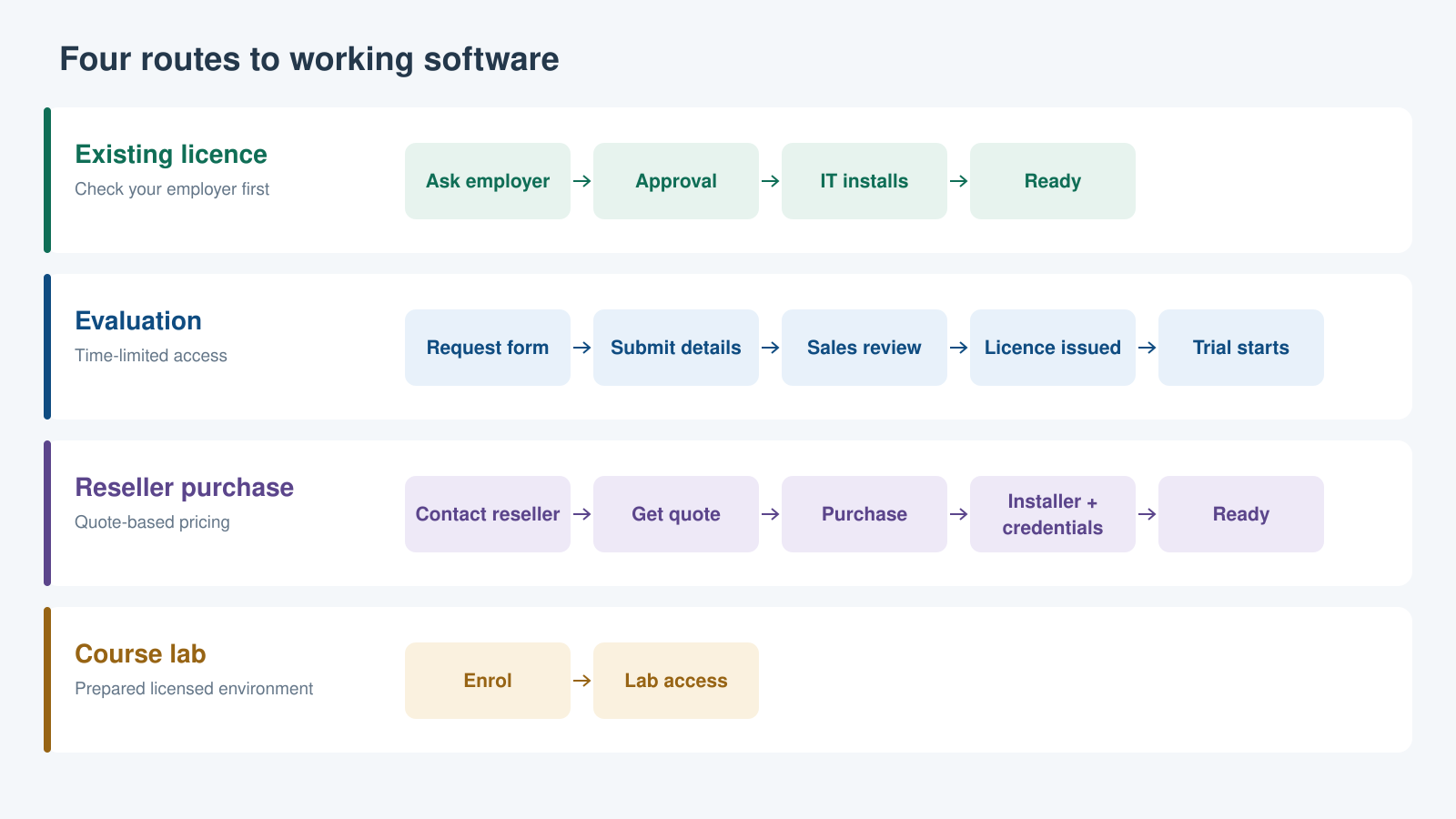
Four routes, very different timelines. The top lane is the one most people never check.
How to Get CAESAR II Through an Authorised Reseller
System Requirements to Check Before You Install
CAESAR II is modest on hardware by modern standards, and the constraints that actually bite are the operating system edition and the graphics driver.
| Item | What to check |
|---|---|
| Operating system | Windows only; no macOS version exists. Recent versions target current 64-bit Windows 10 and Windows 11 releases, Professional or Enterprise editions. Home editions are commonly outside the tested configuration, which catches out people installing on a personal laptop |
| Processor and memory | Undemanding relative to 3D design software. Any current workstation or business laptop is comfortably past the published minimum; large dynamic analyses benefit from more memory and faster cores |
| Graphics | A dedicated card with current manufacturer drivers, supporting OpenGL and DirectX. Motherboard-integrated graphics are generally not recommended for desktops. Outdated display drivers cause more first-run problems on this software than any other single cause |
| Display | A reasonable resolution with true colour. The interface is dense with input grids and result tables, and a small low-resolution screen makes it genuinely unpleasant |
| Disk space | Small by modern standards. The installer and program files are not the constraint; project files are also modest |
| Rights and connectivity | Administrator privileges on the machine to install, and an internet connection for licence activation, since current licensing is cloud-based |
| Requirements differ by version. Confirm the published specification for your exact release on the vendor's official documentation before installing, rather than relying on any third-party summary including this one. | |
Why this table gives ranges rather than exact figures
Published minimum specifications change between releases, and precise figures circulating online are frequently copied from old documentation or, worse, from unofficial download sites reproducing an outdated spec sheet. Rather than give you a precise-looking number that may be wrong for your version, this guide tells you what to check and where. Get the specification for your exact release from the vendor's own documentation or from the reseller who sold you the licence. If a figure matters for a purchase decision, it is worth the email.
How to Install CAESAR II After You Receive It
Licensing: Intergraph Smart Licensing vs Legacy HASP Keys
If you are installing today, licensing is cloud-based and there is no dongle. This section exists because a great deal of the CAESAR II documentation online predates the change and will send you looking for hardware you do not have.
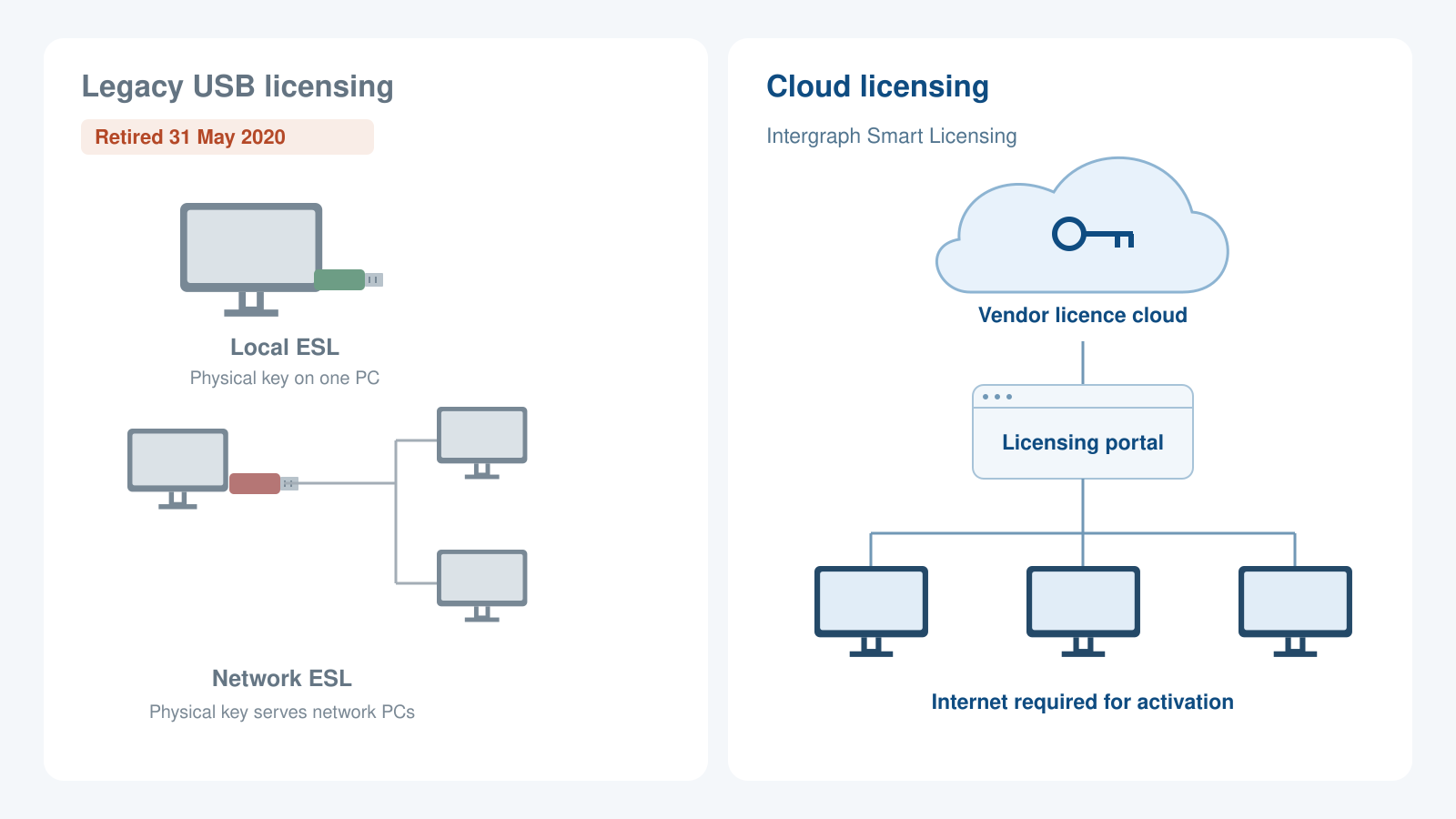
The USB key is gone. Documentation that tells you to plug in a green or red dongle predates 31 May 2020.
What replaced what
- The old way: External Software Locks. Physical USB dongles. A green local ESL plugged into your machine and could be moved between desktop and laptop. A red network ESL sat on a networked machine serving several users. The software simply would not run without the key present.
- Also legacy: SmartPlant License Manager. A software-based server model that sat alongside the dongles.
- The current way: Intergraph Smart Licensing. Cloud-based. Licence keys live on vendor servers, accessed through a web portal, so activation needs an internet connection rather than physical hardware.
- The hard date. CAESAR II stopped responding to HASP keys after 31 May 2020. Dongle-based licensing is not an option for a current installation, and instructions describing it are simply out of date.
Working offline
Cloud licensing raises an obvious question for site work and travel. The system supports checking licences out for offline use for a defined period. When a checked-out licence expires, the software tells you and reverts to attempting a normal connected licence. If you will be working somewhere without reliable connectivity, ask your administrator or reseller about checkout before you travel, not after, because the checkout has to be done while you still have a connection.
Launching and Activating CAESAR II for the First Time
If your firm runs licensing centrally
In most EPCs and engineering consultancies, licensing is managed by IT rather than by you. Seats are administered centrally, allocated to users or machines, and activated as part of a standard build. If that describes your situation, stop at step 1 and raise a request with your IT administrator rather than trying to activate yourself. You may not have the credentials, and an individual activation attempt against a managed pool can consume a seat someone else needs.
If You Can't Get a Licence Fast Enough
The friction is real and it is not your fault. Every route above involves someone else: an employer, a sales representative, a reseller, an IT administrator. None of them completes in an afternoon, and if you are trying to build a skill because you want a stress analysis role, waiting is expensive in a way that is easy to underestimate.
Three things worth saying plainly at this point.
- The software is not the skill. Pipe stress analysis is a body of engineering knowledge: code requirements, load cases, restraint behaviour, expansion loops, allowable stress, support selection. You can start learning all of that before you touch the software, and engineers who do arrive far more competent than those who learned which buttons to press.
- The reading is genuinely available. ASME B31.3 is the working reference for process piping, and the concepts behind flexibility analysis are well documented in textbooks and standards. Nothing is gatekeeping the engineering.
- Licensed lab access solves both problems at once. A course that supplies a configured, licensed environment removes the access problem and teaches the engineering alongside the tool, which is the combination employers actually hire for.
Our Piping Design programme is built that way: licensed software access provided, no installation or licensing to chase, and the stress analysis fundamentals taught alongside the software rather than instead of it.
Frequently Asked Questions
Sources
- Octave, octave.com, for the current product family structure and confirmation of the renaming from the former Hexagon portfolio.
- Hexagon AB, corporate newsroom, for the Octave spin-off and its completion in May 2026.
- CAESAR II Quick Reference Guide (vendor documentation), for the three historical licensing types: local External Software Lock, network External Software Lock, and SmartPlant License Manager, and for the licence checkout behaviour described above.
- Vendor licensing transition notices, for the move to Intergraph Smart Licensing and the stated end of HASP key support after 31 May 2020.
- Vendor product documentation for system requirements, which vary by release and should be confirmed for your specific version before installing.
Currency and scope of this guide
This guide was written shortly after a major corporate and product renaming, and vendor pages, reseller arrangements, trial terms and documentation URLs are all in flux as a result. Treat the process descriptions here as accurate in shape and confirm the specifics with the vendor or your reseller. System requirements, trial duration and licensing terms are set by the vendor and change between releases; no figure in this article should be used as the basis of a purchase decision without checking it against current official documentation. Installation steps describe the general flow rather than one exact version's wizard.
This article was last reviewed on 1 August 2026.
