Revit MEP Interview Questions: Modeling, Systems, Families and Coordination
October 22, 2026
4:32 pm
anirban
Facebook
LinkedIn
WhatsApp
Revit MEP interviews test five things: whether you know the software's building blocks, whether you can model systems that actually connect, whether you understand the engineering behind sizes and flows, whether you can build clean families, and whether your model survives coordination with other trades. Below are 50 questions with model answers, sorted by level, plus a practical test brief.
A portfolio discussion connects modelling choices with engineering decisions. AI-generated editorial image.
Revit is now one product: "Revit MEP" means using Revit's MEP tools, and interviewers notice outdated vocabulary.
Fresher questions test families, parameters, views and system classifications.
Mid-level questions test connectors, routing preferences, sizing tools, spaces and worksharing.
Senior questions test model health, BIM Execution Plans and resolving coordination conflicts.
Most interviews include a practical test, so practise modelling a small connected system against the clock.
The best answers explain why, not just which button to press.
What Employers Ask For
Our analysis of 100 recent MEP job ads in India and the Gulf shows where Revit fits in hiring:
40%
of Indian MEP ads named Revit, against 20% of Gulf ads.
9 of 45
Indian ads were BIM or drafting roles, all built around Revit modelling.
22%
of Indian ads asked for clash detection or BIM coordination.
Revit roles cluster in Indian design offices and BIM service firms modelling for Indian, Middle Eastern, UK, US and Australian projects. That is why coordination and families feature so heavily in the questions below.
How Revit MEP Interviews Usually Run
Stage 1
Screening
Quick basics: versions used, project types, which disciplines you modelled.
Stage 2
Technical
Questions like those below, often escalating until you reach your limit.
Stage 3
Practical test
Model a small system or family on a test machine, usually timed.
Stage 4
Portfolio review
Walk through your own model or sheets and justify decisions.
Where the 50 questions focus
Question coverage in this guide
Basics8
Modeling9
Systems and calculations11
Families and parameters8
Coordination and worksharing9
Documentation5
Counts reflect this article’s 50 questions, not the frequency of questions in employers’ interviews.
The 50 Questions
Filter by level, and tick each question you could answer confidently in an interview. The meter tracks your readiness.
Ready
0 / 50
Revit MEP Basics
Screening questions. Interviewers use these to check you have actually used the software, not just watched tutorials.
Q01
What is Revit MEP, and is it still a separate product?
Fresher
Revit MEP was the mechanical, electrical and plumbing edition of Revit. Since Revit 2017 there is a single Revit product that includes architecture, structure and MEP tools, so "Revit MEP" now means using Revit for MEP work.
That you know the current product, not an outdated version name.
Q02
What is the difference between a system family, a loadable family and an in-place family?
Fresher
System families (ducts, pipes, cable trays, walls) exist only inside a project and are duplicated, not loaded. Loadable families (.rfa files such as diffusers, valves, equipment) are created in the Family Editor and loaded into projects. In-place families are one-off elements modelled inside the project and should be used sparingly.
A clear three-way split, with a warning against overusing in-place families.
Q03
What is the difference between type and instance parameters?
Fresher
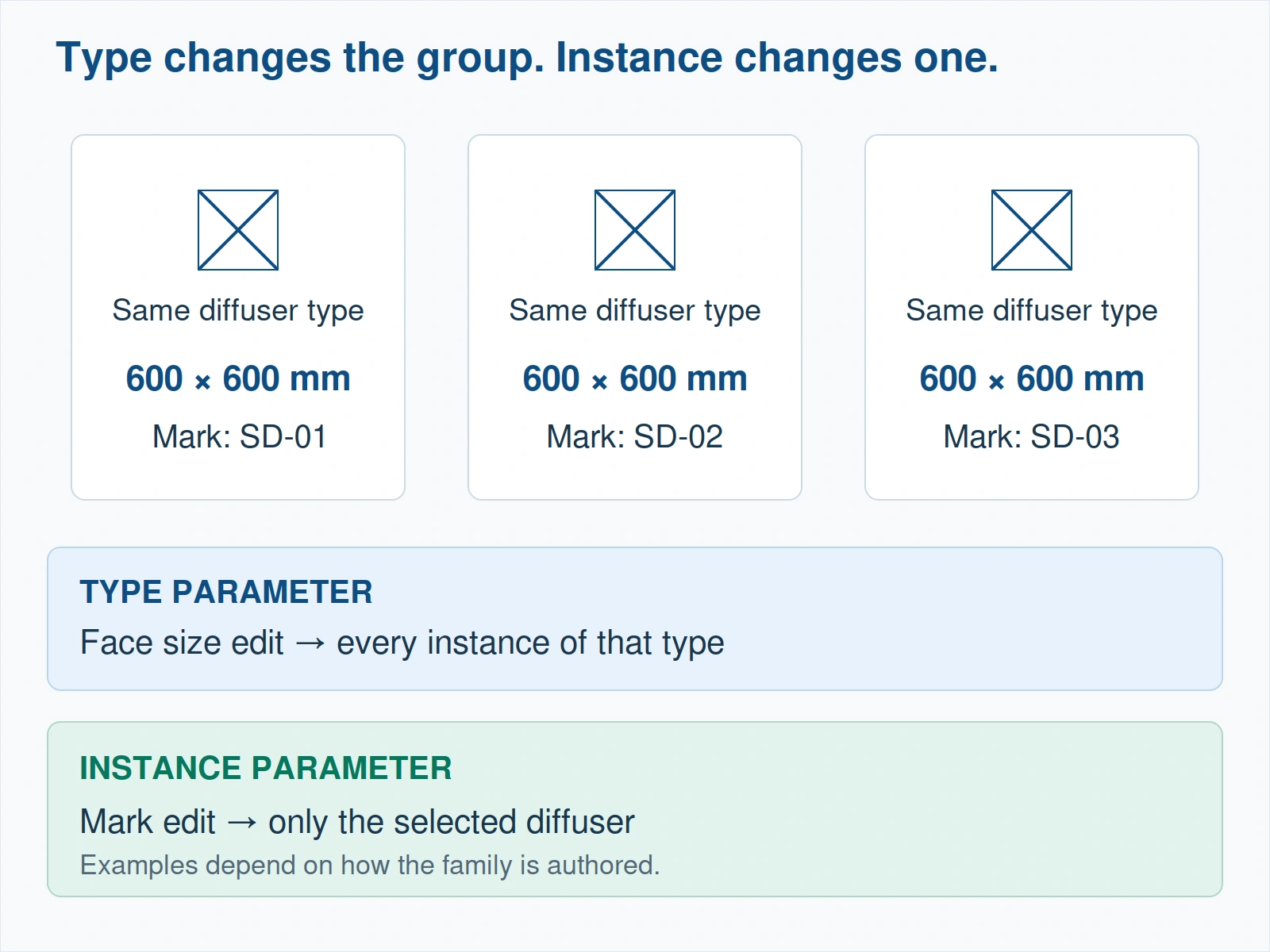
A type parameter changes every element of that type at once, for example a fitting's material. An instance parameter belongs to one placed element, for example its offset or a mark. Choosing correctly decides whether one edit updates one element or hundreds.
A practical example, not just definitions.
Q04
What are Revit templates and why do MEP teams use their own?
Fresher
A project template (.rte) carries pre-set view templates, filters, line styles, system types, duct and pipe types, schedules and title blocks. Firms build their own so every project starts with consistent graphics and standards instead of rebuilding them each time.
Awareness that templates hold standards, not just a blank file.
Q05
How do you control what a view shows?
Fresher
Through the view range and view depth for plan views, Visibility/Graphics overrides by category and subcategory, view filters by parameter (for example system classification), the view's discipline and sub-discipline, and view templates that apply all of these consistently.
Filters and view templates mentioned without prompting.
Q06
What do the .rvt, .rfa, .rte and .rft file types mean?
Fresher
.rvt is a project, .rfa a loadable family, .rte a project template and .rft a family template. Knowing which file you are in explains why some tools are available and others are not.
Instant, correct answers: this is a screening question.
Q07
Why should an MEP model use the architect's levels and grids?
Fresher
Levels and grids are the shared reference for every discipline. If the MEP model creates its own, elements drift out of line with the architecture and structure. Teams usually copy and monitor them from the linked model so any change is flagged.
Mentioning Copy/Monitor or a shared reference.
Q08
Why might a duct you modelled be invisible in a plan view?
Mid-level
Usually the view range cuts above or below it, the category or a filter is hidden in Visibility/Graphics, a view template is overriding settings, the element sits in a hidden workset or a different phase, or the view discipline is set to hide it. Check them in that order.
A systematic checklist rather than guessing.
Walk Into Your Revit MEP Interview Ready
Model connected HVAC and plumbing systems, build parametric families and run coordination on real project files, the exact skills these 50 questions test.
How you build ducts, pipes and equipment, and whether the model will survive coordination.
Q09
How do routing preferences work for pipes and ducts?
Fresher
Routing preferences, set in the type properties of a pipe or duct type, define which segment (material and schedule) and which fittings Revit uses automatically, by size range: elbows, tees, crosses, transitions, taps and unions. Wrong routing preferences are a common cause of missing or wrong fittings.
Knowing that fittings are driven by the type, not placed by hand.
Q10
How do you change a duct's height after it is drawn?
Fresher
Select the run and change its middle elevation (the centre-line height) in Properties or on the options bar, or adjust it in a section view. Check connected fittings and branches afterwards, because a height change can break or distort connections.
Checking connections after the change.
Q11
How do you model sloped sanitary pipework?
Mid-level
Set the slope value before or while drawing the pipe (on the Modify | Place Pipe options), or apply the slope tool to an existing run. Start from the fixed point, usually the stack or the lowest connection, so the fall runs the correct way, and check invert levels on sections afterwards.
Starting from the fixed end, and checking inverts in section.
Q12
How do you connect equipment to a system that is already modelled?
Mid-level
Use Connect Into on the equipment, or draw from the equipment's connector so Revit creates the fittings. The connector's system classification must match the system you are connecting to, otherwise the connection fails or lands in the wrong system.
Understanding that connectors carry the system classification.
Q13
What does "Show Disconnects" do, and why run it?
Mid-level
It flags open connectors on ducts, pipes, cable trays, conduits and equipment that are not connected to anything. Running it before issuing a model catches gaps that break system calculations, schedules and clash results.
Running checks before issue as a habit.
Q14
What is the difference between design and fabrication parts?
Mid-level
Design parts are the standard Revit ducts, pipes and fittings used for design intent. Fabrication parts come from a fabrication configuration (Autodesk Fabrication content) and represent real manufacturer parts with fabrication data for spooling and detailing, typically at higher level of development.
Knowing when a project moves from design intent to fabrication detail.
Q15
How do you model cable trays and conduits, and how do they differ from ducts and pipes?
Mid-level
They are drawn with their own tools and types, either with or without fittings, and use routing settings much like ducts. Unlike ducts and pipes they do not form calculated systems; circuits are handled through electrical connectors on devices and equipment instead.
Knowing trays and conduits carry no system calculation.
Q16
What does Generate Layout do, and would you rely on it?
Mid-level
Generate Layout proposes routing solutions to connect the components of a selected duct or pipe system, which you can review, edit and accept. It is useful for a quick first pass, but routes still need checking for coordination, access and sensible fitting counts.
Using automation as a draft, not a final answer.
Q17
How do you keep a large MEP model fast and stable?
Senior
Purge unused families and types, resolve warnings regularly, avoid in-place families and over-detailed equipment, unload links you do not need, use worksets so each user opens only what they need, keep views lean, and audit and compact the central model periodically.
Treating warnings and file health as part of the job.
Systems and Calculations
This is where design-office interviews separate modellers from engineers.
Q18
What is a system classification, and name some for ducts and pipes?
Fresher
A system classification tells Revit what a system does. Ducts use classifications such as Supply Air, Return Air and Exhaust Air; pipes use classifications such as Hydronic Supply, Hydronic Return, Domestic Cold Water, Domestic Hot Water, Sanitary, Vent and Fire Protection Wet or Dry. System types are created under these classifications.
Knowing that system types sit under a fixed set of classifications.
Q19
What is the System Browser used for?
Fresher
The System Browser (F9) lists every system and the elements in it, and shows elements not assigned to any system. It is the fastest way to find unassigned equipment and check that a system contains what it should.
Mentioning the "unassigned" check.
Q20
How does Revit add up airflow in a supply system?
Fresher
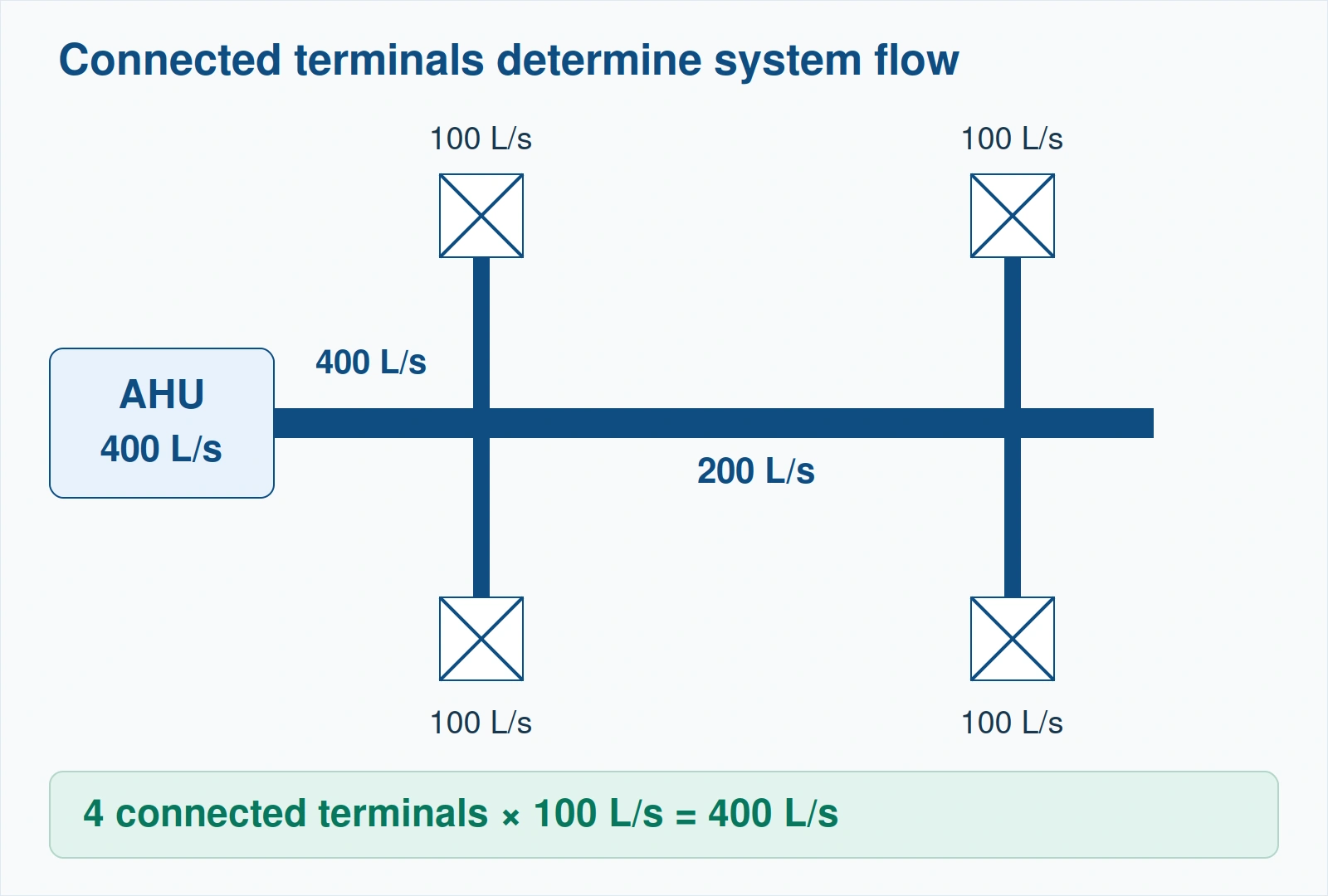
Each air terminal carries a preset flow. Revit sums those flows back along the connected ducts to the equipment, whose connector is set to calculated. If a terminal is disconnected or misclassified, its flow simply goes missing from the total.
Understanding why disconnects make totals wrong.
Q21
What sizing methods does the Revit Duct Sizing tool offer?
Mid-level
Friction, velocity, equal friction and static regain, with constraints such as maximum height and width. Pipe sizing works on friction or velocity. The tool sizes from the flows in the system, so connector flows must be correct first.
Knowing the tool depends on correct flows upstream.
Q22
What do the connector flow configuration options Calculated, Preset and System mean?
Mid-level
Preset means the flow is a fixed value entered on the connector, typical for air terminals. Calculated means the flow is summed from downstream elements, typical for equipment serving several terminals. System means the connector takes its value from the system. Flow direction is set separately as in, out or bidirectional.
Correctly matching Preset to terminals and Calculated to equipment.
Q23
What is the difference between rooms and spaces in Revit?
Mid-level
Rooms are architectural elements. Spaces are the MEP equivalent used for load analysis and airflow: they hold occupancy, lighting and equipment loads and can be placed using the room boundaries of a linked architectural model, provided Room Bounding is enabled for that link. Zones group spaces served by the same system.
Knowing the Room Bounding setting for linked models.
Q24
How do you produce a duct or pipe pressure loss report?
Mid-level
Run the duct or pipe pressure loss report on a correctly connected system with flows assigned. It lists sections, flows, velocities and losses through segments and fittings, which you then check against the design and manual calculations.
Checking Revit's numbers rather than trusting them blindly.
Q25
How do you set up a new piping system type, such as condenser water?
Mid-level
Duplicate an existing system type under the right classification (for example Hydronic Supply), rename it, set its abbreviation, fluid type and temperature, and assign graphic overrides or a view filter so it displays distinctly.
Choosing the classification first, then graphics and fluid.
Q26
What are Mechanical Settings used for?
Mid-level
They hold project-wide duct and pipe settings: angle increments, conversion defaults, available segments and sizes, fluid properties, calculation methods and the symbols used for rise and drop. Sizes not listed there cannot be selected or produced by the sizing tools.
Linking available sizes to Mechanical Settings.
Q27
Would you use Revit's load calculation in place of HAP or TRACE?
Senior
Many offices still use dedicated load software such as HAP or TRACE for the design load and use Revit spaces and zones for airflow and documentation. The right answer depends on the office's standard; what matters is consistency between the load report and the model's airflows.
A considered answer that defers to office standards.
Q28
A system shows inconsistent flow or splits into several systems. How do you fix it?
Senior
Check connector classifications and flow directions on equipment and terminals, look for open ends with Show Disconnects, confirm every element is in the intended system in the System Browser, and review the system warnings. Most cases trace back to one misconfigured connector.
Starting from connectors, not redrawing the system.
Families and Parameters
A favourite topic for BIM modeller roles. Expect at least one practical family task, so walk through our Revit family creation guide before the interview.
Q29
How do you create a new MEP family, for example a diffuser?
Fresher
Start from the correct category template (for an air terminal, an air terminal template), build reference planes and dimensions first, add parametric geometry, add a duct connector with the right classification, flow configuration and size parameters, then test in a project by flexing sizes and connecting a duct.
Category first, connectors added and the family tested in a project.
Q30
Why do you build reference planes and dimensions before family geometry?
Fresher
Geometry locked to reference planes flexes predictably when parameters change. Dimensions on reference planes become the parameters, so the family behaves correctly at every size instead of breaking when a value is edited.
Flexing the family to test it.
Q31
Why does the family category matter?
Mid-level
The category controls how the element behaves and where it appears: which schedules and tags can read it, how Visibility/Graphics controls it, and which MEP calculations treat it as equipment, a fixture or a terminal. Choosing the wrong category breaks scheduling and filtering.
Linking category to schedules, tags and filters.
Q32
What is the difference between family, project and shared parameters?
Mid-level
Family parameters exist only inside the family and cannot be tagged or scheduled. Project parameters are added in a project and can be scheduled, but cannot be shown in tags. Shared parameters are defined in a shared parameter file, so they can be used in families, schedules and tags consistently across projects.
Stating that tags need shared parameters.
Q33
How do you make a family flexible without making it heavy?
Mid-level
Use type catalogs or a sensible number of types, parameter-driven geometry with formulas, visibility parameters and detail levels (coarse, medium, fine) instead of extra geometry, nested families only where they add real value, and avoid imported CAD geometry.
Detail levels and type catalogs.
Q34
How do you make a family work with electrical circuits?
Mid-level
Add an electrical connector with the correct system type (for example power or lighting), number of poles, voltage and load, ideally linked to family parameters. Without a correctly set connector the element cannot be assigned to a circuit or counted in panel loads.
Voltage and poles matching the panel.
Q35
A manufacturer family is 40 MB. What do you do?
Senior
Check what makes it heavy, usually imported CAD or excessive detail. Either simplify it (keep the envelope, connectors and data, drop internal detail) or build a lighter in-house version with the same parameters, keeping the manufacturer data for schedules.
Protecting model performance without losing data.
Q36
How would you manage a family library for a team?
Senior
Agree naming conventions, control the shared parameter file centrally, keep approved families in one managed location, check new families against a QA list (category, connectors, parameters, detail levels, file size), and version them so projects know what changed.
Control of the shared parameter file.
Family parameter example: a type-level face size applies to all matching instances; each placed diffuser can have its own instance mark. Click the image to enlarge.
Coordination, Linking and Worksharing
Senior and BIM coordinator interviews spend most of their time here.
Q37
How do you link architectural and structural models into an MEP model?
Fresher
Insert them as Revit links, usually positioned by shared coordinates, so all disciplines line up. Pin the links, use them as references for levels and grids (with Copy/Monitor where the BIM Execution Plan requires it) and set their visibility through view templates.
Shared coordinates and pinning.
Q38
What are shared coordinates, the project base point and the survey point?
Mid-level
The survey point ties the model to a real-world coordinate system; the project base point is the project's own reference origin. Shared coordinates let separate models agree on a common position, so they line up when linked into each other and when exported to Navisworks or IFC.
Knowing why linked models end up in the wrong place.
Q39
Explain worksharing: central model, local copy, worksets and synchronizing.
Mid-level
A central model is stored on a server or cloud; each user works in a local copy and synchronizes with central to push and receive changes. Worksets divide the model so users can open only what they need. Elements are borrowed for editing and must be relinquished, usually on synchronize.
The relinquish step and why users get blocked.
Q40
How do you check clashes in Revit, and when do you use Navisworks instead?
Mid-level
Revit's Interference Check compares selected categories in the current model or against a link and gives a report. For multi-discipline coordination with clash grouping, rules, tracking and issue management, teams use Navisworks Manage Clash Detective or a cloud coordination tool on the federated models.
Knowing the limits of Revit's own check.
Q41
How do you handle sleeves and openings for MEP penetrations?
Mid-level
Agree the method in the BIM Execution Plan: typically sleeve or opening families placed where services cross walls, slabs and beams, scheduled and issued to the structural engineer for approval before construction. Penetrations through beams always need structural sign-off.
Mentioning structural approval for beam openings.
Q42
What is Copy/Monitor, and when do you use it?
Mid-level
Copy/Monitor copies elements such as levels, grids and certain fixtures from a linked model and watches them for changes. When the linked model changes, Coordination Review lists the differences so you can accept or respond to each one.
Naming Coordination Review.
Q43
How do you prepare an MEP model for Navisworks?
Mid-level
Export NWC files with the Navisworks exporter, or let Navisworks read the RVT directly, using shared coordinates so every discipline aligns. Export only the views and worksets needed, so the federated model stays clean and light.
Coordinates and a clean export view.
Q44
What is a BIM Execution Plan, and what does an MEP modeller need from it?
Senior
The BEP sets the project's BIM rules: software versions, file naming, coordinates, level of development per stage, worksets, model ownership, clash detection schedule and tolerances, and exchange formats. An MEP modeller needs it to know what to model, to what detail, and how to deliver.
Naming LOD, coordinates and clash process.
Q45
Two trades both claim the same ceiling space. How do you resolve it?
Senior
Start with the less flexible service: gravity drainage, then large ducts, then pressurised pipes, then cable trays. Check sections, propose options with levels, raise it in the coordination meeting with a clash ID, and record the agreed solution so it is not reopened.
A process with priorities and records, not just "move the duct".
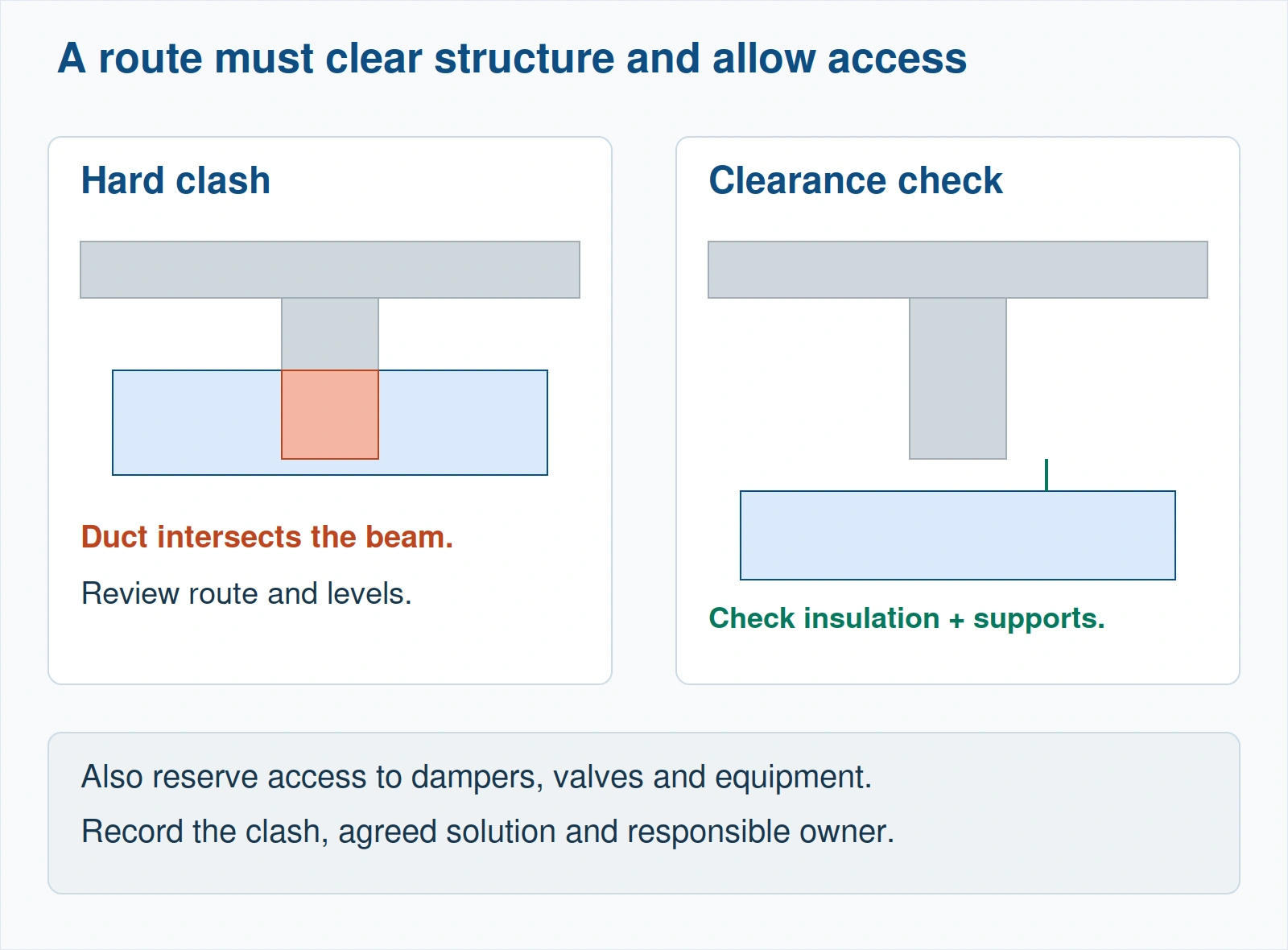
Coordination review: removing a visible intersection is only part of the check. Allow for insulation, supports and maintenance access before accepting the route. Click the image to enlarge.
Documentation, Schedules and Tags
Output questions. These show whether your model can actually be issued.
Q46
How do you tag ducts and pipes efficiently?
Fresher
Use category tags (duct, pipe, air terminal tags) with Tag All Not Tagged for a whole view, or multi-category tags for mixed elements. Tags read parameters, so the size, system or flow they display must exist on the element.
Using Tag All, not tagging one by one.
Q47
How do you create an equipment or air terminal schedule?
Mid-level
Create a schedule for the category, add fields (including shared parameters), sort and group, add calculated values or totals where needed, and apply a filter (for example by level or system). A key schedule can drive standardised values across many elements.
Calculated values and key schedules.
Q48
How do electrical circuits and panel schedules work in Revit?
Mid-level
Devices and equipment with electrical connectors are assigned to circuits on a panel; the panel's distribution system and voltage must match the device. Revit then sums loads by circuit and produces panel schedules, with load classifications and demand factors applied.
Matching distribution system and voltage.
Q49
What is the difference between Duplicate, Duplicate with Detailing and Duplicate as Dependent?
Mid-level
Duplicate copies the view without annotation. Duplicate with Detailing also copies tags, dimensions and detail items. Duplicate as Dependent creates a child view that shares the parent's settings and annotation, used to split a large floor across several sheets.
Using dependent views for large floors.
Q50
How do you make sure drawings stay consistent across 100 sheets?
Senior
View templates for every view type, standard filters by system classification, a controlled tag and annotation set in the template, sheet and view naming per the BEP, and a final check of schedules and title-block parameters before issue.
View templates as the backbone.
Practise These on Real Project Models
Revit MEP Designing and Modeling course: systems, families and coordination.
Practical tests vary by firm, but most look something like this. Practise it at home with a timer before your interview.
Sample practical test: office floor HVACAllow 60 to 90 minutes. Linked architectural model provided.
Tasks
Link the architectural model by shared coordinates and set up a mechanical plan view.
Place spaces from the linked rooms.
Place supply diffusers with a given airflow per diffuser.
Model the supply main and branches from a shaft, connected to every diffuser.
Size the ducts with the Duct Sizing tool to a stated friction rate.
Tag ducts and terminals, and create an air terminal schedule with airflow totals.
Place the result on a sheet.
How it is usually judged
Every terminal connected to one system, with no disconnects.
Correct system classification and type.
Sensible routing, fittings from routing preferences.
Schedule totals that match the design airflow.
Clean views: filters, tags and a readable sheet.
Finishing on time with a working model, over a perfect but unfinished one.
Questions to Ask the Interviewer
Which Revit version and template do your projects use?
Do you work to a BIM Execution Plan, and what LOD do you model to?
Do you use design parts, fabrication parts, or both?
How is clash detection run, and who chairs coordination meetings?
Which markets are your projects in: India, the Gulf, UK, US?
Will I do calculations, or modelling from engineers' mark-ups?
Figure 1: Connected-system teaching diagram. Trace each terminal to the AHU and reconcile the total with the air terminal schedule. This is an original diagram, not a Revit screenshot. Click the image to enlarge.
Frequently Asked Questions
What are the most common Revit MEP interview questions?
Expect questions on system versus loadable families, type versus instance parameters, system classifications, routing preferences, connectors, the System Browser, duct and pipe sizing, rooms versus spaces, linking and shared coordinates, worksharing, and clash detection. For the engineering side of the panel, also prepare our MEP engineer interview questions.
Is there a practical test in Revit MEP interviews?
Many firms include one, especially BIM service companies. A typical test asks you to model and size a small connected system, tag it, schedule it and place it on a sheet within about an hour.
How should a fresher prepare for a Revit MEP interview?
Master the fresher questions above, build one small connected HVAC or plumbing model end to end, create one parametric family with a connector, and be able to explain each step. A short portfolio of your own sheets helps more than a list of software.
Do Revit MEP interviews include engineering questions?
Design-office interviews often do: how airflow is derived, why duct sizes change, why drainage needs slope. BIM modeller roles focus more on modelling, families and coordination, but engineering understanding still separates strong candidates.
Want Feedback Before Your Interview?
Talk to an advisor about the PG Program in MEP Design and Drafting.
Autodesk Revit Help documentation for system families, routing preferences, connectors, duct and pipe sizing, spaces and zones, worksharing, shared coordinates and interference checking.
Augmintech analysis of 100 MEP job advertisements (India and the Gulf, collected 17 October 2026), for the share of ads naming Revit, BIM roles and coordination.
This article was last reviewed on 17 October 2026.
Ready to start your engineering career journey?
Investing in structured training is one of the best ways to set yourself apart in MEP engineering. Our Courses cover HVAC, electrical and plumbing design in depth, plus tools like HAP software — the exact skillset that sets you apart in a competitive field.